How to shoot wide landscapes in panoramic mode is a journey into capturing the breathtaking scope of the natural world. This guide will demystify the process, offering insights from fundamental principles to advanced techniques, ensuring your panoramic vistas are as awe-inspiring as the scenes themselves.
We will delve into the essential camera settings, explore creative compositional strategies, and discuss the gear that can elevate your wide-angle captures. From understanding the nuances of light to mastering post-processing, this comprehensive overview is designed to equip you with the knowledge and skills to transform ordinary shots into extraordinary panoramic masterpieces.
Understanding Panoramic Photography Basics
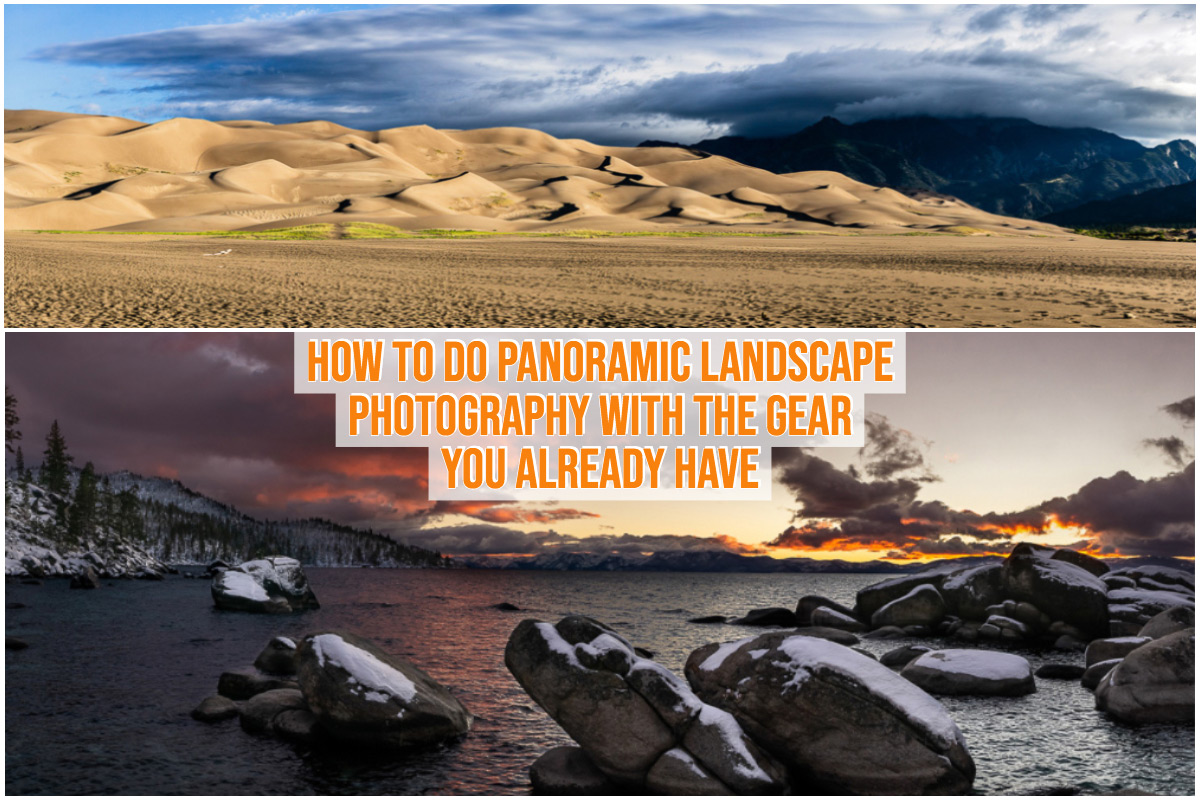
Panoramic photography allows us to capture a significantly wider field of view than what a standard photograph can encompass. This technique is particularly powerful for landscape photography, enabling us to convey the vastness and grandeur of a scene that might otherwise be lost. By expanding our visual perspective, we can tell a more complete story of a location.The fundamental concept of panoramic photography involves either a single ultra-wide lens or, more commonly, the merging of multiple overlapping images to create a single, expansive frame.
This is achieved by either the camera’s built-in panoramic mode or through manual techniques of taking sequential shots and stitching them together later using software.
The Concept of a Wider Field of View
A standard camera lens typically captures a field of view comparable to human binocular vision, usually around 50-60 degrees horizontally. Panoramic photography aims to surpass this, extending the horizontal view to 90 degrees, 180 degrees, or even a full 360 degrees. This dramatic increase in perspective is what distinguishes panoramic images and allows them to showcase sweeping vistas.
Purpose and Advantages in Landscape Photography
The primary advantage of shooting in panoramic mode for landscape photography is the ability to capture the entirety of a breathtaking scene. This includes:
- Showcasing expansive vistas that a standard shot would crop.
- Emphasizing the scale and depth of a landscape.
- Creating a more immersive and engaging viewing experience for the audience.
- Allowing for a more comprehensive storytelling of a location’s features, such as a long coastline, a vast mountain range, or a sweeping desert.
Typical Limitations and Considerations
While powerful, panoramic modes come with certain limitations and require careful consideration:
- Distortion: Wide-angle views, especially those approaching 180 degrees, can introduce barrel distortion, where straight lines appear to curve outwards. This is more pronounced with wider lenses or when the camera is not kept perfectly level.
- Motion Blur: If there is significant movement within the scene (e.g., clouds, water, people), this can lead to ghosting or smearing artifacts when the multiple images are stitched together.
- Lighting and Exposure: Maintaining consistent lighting and exposure across all frames can be challenging, especially in scenes with high dynamic range (bright skies and dark foregrounds). Some cameras attempt to compensate, but manual control might be necessary for optimal results.
- Focus: Ensuring that the entire panoramic frame is in focus can be tricky. Deep depth of field is usually required, which may necessitate smaller apertures, leading to longer exposure times.
- Composition: Composing a compelling panorama requires a different approach. The viewer’s eye will naturally scan across the wide frame, so the composition needs to guide them effectively from one end to the other.
Comparison of Panoramic Capture Methods
There are two main approaches to capturing panoramic images:
- Dedicated Panoramic Mode: Many modern cameras and smartphones feature a built-in panoramic mode. This mode typically guides the user to pan their device across the scene at a consistent speed and angle. The camera then automatically captures a series of images and often stitches them together in-camera.
- Advantages: Simplicity, speed, and ease of use. Often produces decent results with minimal effort.
- Disadvantages: Less control over the stitching process, potential for stitching errors, and limited customization options. The resulting image resolution might also be lower compared to manual stitching.
- Stitching Multiple Shots Manually: This method involves taking a series of overlapping photographs yourself, ensuring consistent camera settings (aperture, shutter speed, ISO, white balance) and a stable shooting platform (tripod is highly recommended). These individual images are then brought into specialized software (like Adobe Lightroom, Photoshop, or Hugin) for manual stitching.
- Advantages: Maximum control over the capture and stitching process, higher potential for image quality and resolution, and the ability to correct for distortions and other issues more effectively.
- Disadvantages: Requires more skill, time, and post-processing effort.
The choice between these methods often depends on the user’s experience level, the desired level of control, and the intended use of the final image. For beginners, the dedicated mode offers an accessible entry point, while experienced photographers often prefer the manual stitching approach for its superior results.
Essential Camera Settings for Wide Landscapes
Capturing breathtaking wide landscapes in panoramic mode requires a thoughtful approach to camera settings. These settings are crucial for ensuring sharpness, proper exposure, accurate colors, and a pleasing depth of field across your expansive scenes. By mastering these elements, you can transform a good panorama into an extraordinary one.Understanding how each setting impacts your final image is key to making informed decisions in the field.
This section will guide you through the essential camera settings, explaining their role and providing recommendations for optimal results.
Recommended Camera Settings for Panoramic Landscapes
To achieve optimal wide landscape shots in panoramic mode, a consistent and deliberate approach to camera settings is paramount. These recommendations are designed to maximize image quality and minimize potential issues like noise or motion blur, ensuring your panoramas are sharp and well-exposed.
- Shooting Mode: Manual (M) or Aperture Priority (Av/A). Manual mode offers complete control, while Aperture Priority allows you to set the aperture and let the camera manage shutter speed for correct exposure, which can be useful for consistency.
- File Format: RAW. Shooting in RAW format provides the most flexibility for post-processing, allowing you to adjust white balance, exposure, and recover details in highlights and shadows without significant loss of quality.
- Focus: Manual Focus. Once you’ve achieved critical focus, switch to manual focus to prevent the camera from refocusing between shots, which is essential for maintaining sharpness across all segments of your panorama. A good starting point is to focus about one-third of the way into the scene.
- Exposure Metering: Matrix/Evaluative Metering. This mode analyzes the entire scene for exposure. However, for panoramas, it’s often best to lock your exposure (using manual mode or exposure lock in Av/A) to ensure consistency across all frames.
- Image Stabilization: Off. When shooting panoramas, especially with a tripod, it’s generally recommended to turn off image stabilization. It can sometimes introduce slight shifts or artifacts when the camera is panning.
Impact of Aperture Selection on Depth of Field
The aperture you choose directly influences the depth of field in your panoramic images, which is the range of distance in your scene that appears acceptably sharp. For wide landscapes, a larger depth of field is usually desired to ensure that both foreground elements and distant backgrounds are in focus.Aperture is represented by f-numbers (e.g., f/8, f/11, f/16). A smaller f-number (like f/2.8) indicates a wider aperture, resulting in a shallower depth of field and a blurred background.
Conversely, a larger f-number (like f/16) indicates a narrower aperture, producing a greater depth of field, where more of the scene is in focus.For expansive landscapes, photographers often opt for mid-range to smaller apertures, typically between f/8 and f/16. This range provides a good balance between achieving sufficient sharpness throughout the scene and avoiding excessive diffraction, a phenomenon where light bends around the edges of the aperture blades, causing a slight loss of sharpness at very small apertures (e.g., f/22 and beyond).
It is crucial to test your lens at different apertures to determine its sharpest range.
Best Practices for ISO and Shutter Speed Adjustments
Managing ISO and shutter speed is vital for controlling light and preventing motion blur, especially when shooting handheld or in challenging lighting conditions. ISO determines the sensor’s sensitivity to light. A lower ISO (e.g., 100 or 200) produces cleaner images with less digital noise. As you increase the ISO, the image becomes brighter but also gains more noise, which can detract from the image quality, particularly in the fine details of a landscape.
For panoramas, aiming for the lowest possible ISO is ideal, especially if you are using a tripod, which allows for longer shutter speeds. Shutter speed controls how long the camera’s sensor is exposed to light. A faster shutter speed (e.g., 1/500 second) freezes motion but requires more light. A slower shutter speed (e.g., 1 second) allows more light but can result in motion blur if either the camera or the subject is moving.
When shooting panoramas, especially with a tripod, you can often use slower shutter speeds to maintain a low ISO. However, if there is significant movement in the scene, such as wind-blown foliage or water, you will need to adjust your shutter speed accordingly to freeze that motion.When using a tripod, the primary concern for shutter speed is ensuring correct exposure at your chosen aperture and ISO.
If you are shooting handheld, you’ll need to use a shutter speed fast enough to prevent camera shake, often dictated by your focal length (a general rule is 1/focal length).
Adjusting White Balance for Accurate Color Rendition
Accurate color rendition is essential for capturing the true mood and beauty of expansive scenes. White balance (WB) tells your camera how to interpret colors under different lighting conditions, ensuring that whites appear white and other colors are rendered naturally.Most cameras offer automatic white balance (AWB), which works well in many situations. However, for consistent and accurate colors across all segments of your panorama, it is often best to set a specific white balance preset or use a custom white balance.Common white balance presets include:
- Daylight/Sunny: For bright, direct sunlight.
- Cloudy: To warm up images taken on overcast days, compensating for the cooler light.
- Shade: To further warm images taken in shaded areas.
- Tungsten/Incandescent: For indoor lighting.
- Fluorescent: For fluorescent lights.
If you want the most accurate colors, especially when shooting in RAW, you can set a custom white balance using a gray card or a white object in your scene. This involves taking a reference shot of the gray card under the prevailing light conditions and then telling your camera to use that as the white reference. This method ensures that colors are neutral and true to life, which is invaluable for panoramic stitching.
If shooting in RAW, you can always fine-tune white balance in post-processing, but starting with an accurate setting in-camera saves time and effort.
Optimal Settings for Different Lighting Conditions
The ideal camera settings for panoramic landscapes will vary significantly depending on the available light. Here is a comparison of optimal settings for common lighting conditions, assuming you are using a tripod for stability and optimal image quality.
| Lighting Condition | Aperture (f-stop) | ISO | Shutter Speed | White Balance | Notes |
|---|---|---|---|---|---|
| Bright Sun | f/11 – f/16 | ISO 100 – 200 | 1/125s – 1/1000s (adjust for exposure) | Daylight/Sunny | Maximize depth of field, minimize noise. Be mindful of harsh shadows and blown-out highlights. Use graduated neutral density filters if necessary. |
| Overcast | f/8 – f/11 | ISO 100 – 400 | 1/60s – 1/250s (adjust for exposure) | Cloudy | Softer light, good for even illumination. Slightly wider aperture can be used if needed, but maintain good depth of field. Noise might become a factor if higher ISO is required. |
| Dawn/Dusk (Golden Hour) | f/8 – f/11 | ISO 100 – 800 (or higher if necessary) | 1/15s – 1/125s (adjust for exposure) | Custom or Cloudy (often warms up the scene nicely) | Low light conditions require careful exposure. Be prepared for longer shutter speeds. If handholding, increase ISO and shutter speed to avoid blur. Be aware of potential noise at higher ISOs. |
| Low Light (Blue Hour) | f/5.6 – f/8 | ISO 400 – 1600+ | 1s – 30s+ (adjust for exposure) | Custom or specific Kelvin setting (e.g., 3500K-4500K) | Requires very long exposures. Tripod is essential. Be aware of noise at high ISOs and long exposures. Focus stacking might be considered for extreme depth of field. |
Compositional Techniques for Panoramic Landscapes
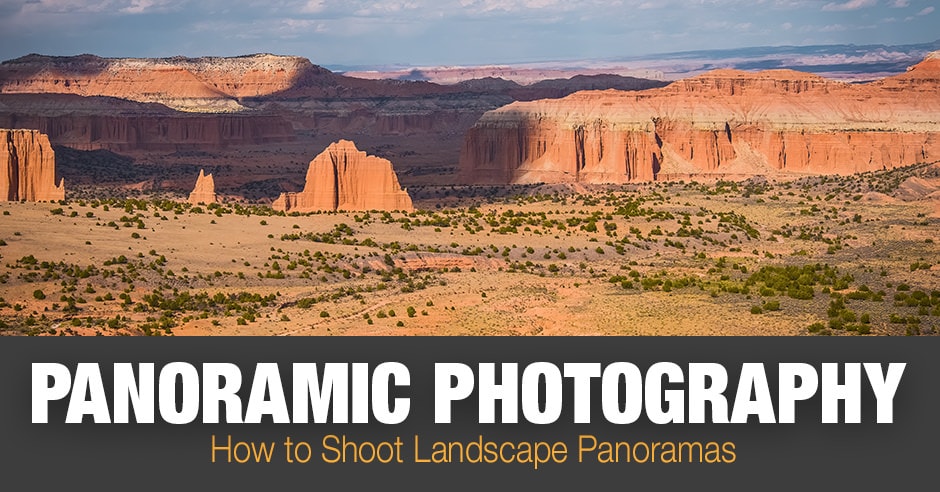
Creating a compelling panoramic landscape photograph involves more than just stitching together multiple shots. It’s about thoughtfully arranging the elements within your expanded frame to guide the viewer’s eye and evoke a specific feeling. By applying established compositional rules, you can transform a simple sweep of scenery into a powerful visual narrative.This section delves into key techniques that elevate your panoramic shots from mere documentation to artistic expressions.
We will explore how to use the vastness of the panoramic format to your advantage, ensuring your images are not just wide, but also engaging and impactful.
Key Compositional Rules for Impactful Panoramas
Several fundamental principles of composition are particularly effective when applied to the expansive nature of panoramic photography. These rules help to organize the scene, create visual interest, and ensure a harmonious flow within the wide frame.
- The Rule of Thirds: Imagine dividing your panoramic frame into nine equal sections by two horizontal and two vertical lines. Placing key elements of your landscape along these lines or at their intersections can create a more balanced and visually appealing image. For example, positioning a striking mountain range along the top third line or a winding river along a vertical line can significantly enhance the composition.
- Symmetry and Patterns: While often associated with smaller frames, symmetry can be incredibly powerful in panoramas, especially when capturing reflections in water or repeating natural formations. Patterns, too, become more pronounced and captivating when viewed across a wider expanse.
- Framing: Use natural elements within the scene, such as overhanging branches, rock formations, or arches, to create a “frame” within your panoramic shot. This technique draws the viewer’s attention to the main subject and adds a sense of depth.
- Negative Space: The empty areas in your composition are just as important as the filled ones. In panoramas, ample negative space, such as a vast sky or an open plain, can emphasize the scale and isolation of your subject, creating a sense of awe and tranquility.
Leading Lines in Panoramic Scenes
Leading lines are powerful compositional tools that guide the viewer’s eye through the photograph, directing them towards the main subject or through the expansive vista. In panoramic photography, their role is amplified due to the increased width of the frame.
Leading lines can take many forms in a landscape. Rivers, roads, fences, shorelines, or even the natural contours of the land can all serve as effective leading lines. When shooting a panorama, consider how these lines can draw the viewer’s gaze from one side of the frame to the other, or from the foreground all the way to the distant horizon.
A well-placed leading line can prevent the viewer’s eye from simply skimming over the image and instead encourage them to explore its depths.
Foreground Interest in Panoramic Vistas
A common pitfall in wide landscape photography is a lack of interest in the foreground, resulting in a composition that feels empty or flat. Incorporating compelling foreground elements is crucial for adding depth, scale, and context to your panoramic vistas.
Foreground interest can be anything that catches the eye and provides a sense of scale or texture. This might include interesting rocks, a patch of wildflowers, a gnarled tree, or even a puddle reflecting the sky. By placing these elements in the immediate foreground, you create a visual anchor that draws the viewer into the scene. This also helps to emphasize the vastness of the background, as the foreground element provides a tangible reference point for the viewer’s perception of distance.
Balancing Elements for Visual Harmony
Achieving visual harmony in a panoramic composition means ensuring that all the elements within the frame work together cohesively. This involves distributing visual weight and attention so that no single area feels too heavy or too empty.
When composing a panorama, think about the distribution of light, color, and form. If you have a very bright and visually dominant element on one side of the frame, you might balance it with a less intense but equally important element on the other side. This could be a darker shadow area, a contrasting color, or a more subdued texture.
The goal is to create a sense of equilibrium that allows the viewer’s eye to move smoothly across the entire image without feeling jarringly pulled to one specific spot.
Common Compositional Challenges in Panoramic Photography and Their Solutions
The unique aspect ratio of panoramic photography presents specific challenges that can be overcome with mindful composition.
| Challenge | Solution |
|---|---|
| “Empty” or “Dead” Space: The wide frame can sometimes lead to large areas with little visual interest, making the image feel boring. | Actively seek out foreground interest, use leading lines to fill the space, or embrace the negative space intentionally to create a mood of solitude or vastness. Consider the sky as a compositional element and look for interesting cloud formations. |
| Distortion: Wide-angle lenses, often used for panoramas, can cause distortion, especially at the edges of the frame. | While some distortion is inherent, be mindful of it during shooting. Try to keep horizons relatively straight and avoid placing critical subjects too close to the extreme edges where distortion is most pronounced. Stitching software can also help correct some distortion. |
| Lack of a Clear Subject: The sheer breadth of a panorama can sometimes make it difficult for the viewer to identify a focal point. | Use compositional techniques like the rule of thirds, leading lines, or framing to draw attention to a specific area or element within the scene. Ensure there is a clear hierarchy of importance among the elements. |
| Repetitive Elements: A long, unbroken vista can sometimes feel monotonous if there aren’t enough variations. | Look for subtle changes in light, texture, or color across the panorama. Incorporate elements that break up the uniformity, such as a solitary tree, a small building, or a change in terrain. |
| Subject Placement: Deciding where to place the main subject in such a wide frame requires careful consideration. | Experiment with placing the subject off-center, using the rule of thirds, or allowing it to be revealed by a leading line. Consider the overall narrative you want to convey and how the subject fits within the expansive environment. |
Gear and Equipment Considerations
To truly excel in wide landscape photography, especially when employing panoramic techniques, the right gear plays a pivotal role. While a good camera is essential, the lenses, stabilization tools, and supporting accessories can significantly elevate the quality and ease of your panoramic shooting experience. Understanding these components will empower you to capture breathtaking, expansive scenes with greater precision and creative control.The selection of equipment is not merely about having the latest technology; it’s about choosing tools that complement your photographic vision and the specific demands of panoramic landscape capture.
From the optical characteristics of your lenses to the stability provided by a robust tripod, each element contributes to the final image.
Lens Selection for Wide Landscapes
While panoramic mode stitches multiple images together, the choice of lens still profoundly impacts the initial capture and the overall feel of the final panorama. For wide landscape photography, even when shooting with panoramic modes in mind, lenses that offer a broad field of view are generally preferred. This allows you to encompass more of the scene in each individual shot, reducing the number of frames needed for a complete panorama and minimizing potential stitching errors.
- Ultra-Wide Angle Lenses: These lenses, typically ranging from 10mm to 24mm on a full-frame sensor, are the cornerstone of wide landscape photography. They capture an expansive perspective, drawing the viewer into the scene and emphasizing the vastness of the environment. When shooting panoramas, an ultra-wide lens allows you to cover a significant portion of the horizon with each frame, making the stitching process more manageable and resulting in a more natural-looking panorama.
- Wide-Angle Lenses: Lenses in the 24mm to 35mm range on a full-frame sensor are also excellent choices. While not as extreme as ultra-wide lenses, they still offer a generous field of view suitable for many landscape scenes. They can provide a more intimate feel to the landscape while still allowing for expansive compositions.
- Prime vs. Zoom Lenses: Both prime and zoom lenses can be effective. Prime lenses often offer superior image quality and wider apertures, which can be beneficial in lower light conditions. Zoom lenses provide flexibility, allowing you to adjust your focal length quickly without changing lenses, which can be advantageous when rapidly capturing a series of shots for a panorama. For panoramic work, however, it’s crucial to maintain a consistent focal length throughout the sequence to avoid parallax errors during stitching.
Tripod and Panoramic Head Benefits
Achieving sharp, seamless panoramic images hinges on stability and precise movement. A sturdy tripod is indispensable for any landscape photographer, but it becomes even more critical when creating panoramas. Specialized panoramic heads offer an additional layer of control, ensuring that your camera rotates around its nodal point, which is essential for distortion-free stitching.The benefits of using a tripod and a dedicated panoramic head are multifaceted:
- Enhanced Stability: A tripod eliminates camera shake, which is crucial for sharp images, especially when shooting multiple frames that will be stitched together. Even minor movements between shots can lead to misalignments and artifacts in the final panorama.
- Precise Rotation: A panoramic head allows the camera to rotate horizontally around the nodal point of the lens. This point, also known as the no-parallax point, is the optical center of the lens. By rotating the camera around this point, you ensure that the perspective remains consistent across all frames, preventing parallax errors that would otherwise manifest as misalignments in the overlapping areas of your shots, particularly noticeable with foreground elements.
- Consistent Framing: With a panoramic head, you can set a consistent interval between shots, ensuring that the overlap between frames is uniform. This consistency is vital for the stitching software to accurately align and blend the images.
- Ease of Use: While it may seem like an extra piece of equipment, a well-designed tripod and panoramic head setup can actually streamline the panoramic shooting process, allowing you to work more efficiently and with greater confidence.
The Role of Filters in Enhancing Wide Landscapes
Filters are powerful tools that can significantly enhance your wide landscape images, adding depth, drama, and technical control to your panoramic captures. They allow you to manipulate light and color in-camera, often reducing the need for extensive post-processing.The primary filters beneficial for wide landscape photography include:
- Polarizing Filters (Circular Polarizers – CPL): These are perhaps the most essential filters for landscape photographers. A CPL filter works by reducing reflections and glare from non-metallic surfaces such as water and foliage, and it can deepen the blue of the sky, making clouds stand out more dramatically. In panoramic photography, a CPL can help achieve consistent saturation and contrast across all frames, ensuring a cohesive final image.
It’s important to rotate the filter to achieve the desired effect, and this rotation needs to be consistent if you are shooting a panorama.
- Neutral Density (ND) Filters: ND filters reduce the amount of light entering the lens without affecting color. This is particularly useful for creating long exposures, allowing you to smooth out moving water, capture the motion of clouds, or achieve a silky effect in waterfalls. For panoramic sequences, using an ND filter requires careful consideration of exposure times to maintain consistency across all shots.
- Graduated Neutral Density (GND) Filters: GND filters have a dark area that transitions to clear. They are invaluable for balancing the exposure between a bright sky and a darker foreground. A soft-edge GND is often preferred for landscapes with uneven horizons (like mountains), while a hard-edge GND is suitable for scenes with a distinct, flat horizon line. Applying GND filters consistently across all frames in a panoramic sequence is crucial for a seamless blend.
Essential Accessories for Outdoor Panoramic Photographers
Beyond the camera, lenses, tripod, and filters, several other accessories can greatly improve the experience and outcome of outdoor panoramic photography. These items are designed to enhance comfort, efficiency, and the overall success of your shoots in varied environments.Key accessories to consider for your outdoor panoramic kit include:
- Remote Shutter Release or Intervalometer: Using a remote release or an intervalometer connected to your camera prevents camera shake that can occur when pressing the shutter button. An intervalometer is particularly useful for automated panoramic sequences, allowing you to set specific time intervals between shots, which is essential for consistent exposure and for capturing moving elements like clouds.
- Lens Cleaning Supplies: Outdoor environments can be dusty and prone to moisture. Having microfiber cloths, a lens brush, and lens cleaning solution is vital to keep your lenses clean and free from smudges or dust that could ruin your shots.
- Extra Batteries and Memory Cards: Panoramic photography, especially when shooting many frames, can consume a lot of battery power and storage space. Always carry spares to ensure you don’t miss opportunities due to depleted power or full memory cards.
- Headlamp or Flashlight: If you plan to shoot at dawn or dusk, or in low-light conditions, a headlamp is invaluable for navigating your shooting location and setting up your gear without fumbling in the dark.
- Weather Protection: Depending on your location and the forecast, consider a rain cover for your camera and tripod. Protecting your gear from the elements is paramount for its longevity and performance.
- Comfortable Camera Bag or Backpack: A well-designed bag will not only protect your equipment but also make it easier to carry everything you need for a day of shooting. Look for one with ample padding and compartments for all your gear.
Shooting Techniques and Workflow
Mastering panoramic photography involves a blend of precise camera handling and a systematic approach to capturing your scenes. This section delves into the practical techniques and workflow that will elevate your wide landscape shots from a series of individual frames to a cohesive, stunning panorama.To achieve seamless panoramas, the way you move your camera is paramount. Smooth, consistent panning ensures that the resulting stitched image looks natural and avoids jarring transitions between individual frames.
This technique is the foundation upon which successful panoramas are built.
Camera Panning Technique
Achieving a smooth pan is crucial for creating panoramas without visible seams or distortions. The goal is to move the camera at a consistent speed and along a single plane.
- Tripod and Panoramic Head: Mount your camera on a sturdy tripod equipped with a panoramic tripod head. This head allows for rotation around the lens’s nodal point, minimizing parallax errors.
- Eye Level and Stable Stance: Stand with your feet shoulder-width apart, maintaining a stable and balanced posture. Keep your eye level consistent with the horizon of your scene.
- Smooth Rotation: Gently rotate the camera using the tripod head’s panning handle. Avoid jerky movements; aim for a fluid, continuous motion. Imagine you are tracing a perfectly straight line with your lens.
- Consistent Speed: Maintain a uniform speed throughout your pan. Practice to develop a feel for the right pace. Too fast a pan can lead to motion blur or missed details, while too slow can result in overexposure in bright conditions if using manual settings.
- Focus on the Subject: While panning, keep your focus point consistent. If shooting in manual focus, set it before you begin and avoid changing it. For autofocus, ensure it locks onto a mid-ground element to maintain sharpness across the frame.
Capturing Overlapping Shots
The magic of stitching panoramas lies in the overlap between individual frames. This overlap provides the software with enough information to accurately align and blend the images.
A well-planned sequence of overlapping shots is the blueprint for a successful panorama. Each frame must contain a portion of the previous and next frame, allowing stitching software to find common points and create a seamless blend. The amount of overlap is critical; too little and the software may struggle, too much and you’re taking unnecessary shots.
Here’s a step-by-step procedure for capturing a series of overlapping shots:
- Establish Your Starting Point: Position your camera to capture the leftmost portion of your desired panorama. Ensure this frame includes elements that will extend into the next shot.
- Determine Overlap Percentage: A general guideline is to aim for 20-30% overlap between consecutive shots. This ensures sufficient common detail for stitching software.
- Capture the First Shot: Take your first photograph.
- Pan and Overlap: Rotate the camera to the right, ensuring that the rightmost portion of the first image is now on the left side of your second shot, fulfilling the overlap requirement.
- Capture the Second Shot: Take the second photograph.
- Continue Panning and Capturing: Repeat the process of panning and capturing, moving from right to left, ensuring consistent overlap and maintaining your camera’s height and angle.
- Review and Adjust: Periodically check your captured images on the camera’s LCD screen to ensure consistent exposure and focus, and to verify the overlap.
- Final Shot: Continue until you have captured the entire desired scene.
Maintaining Consistent Camera Height and Angle
Consistency in camera height and angle is non-negotiable for a natural-looking panorama. Deviations here will result in a “wobbly” or unnatural horizon line, detracting from the overall quality of your stitched image.
The horizon is a fundamental element of landscape photography. When shooting a panorama, any variation in camera height or tilt will cause the horizon to appear uneven in the final stitched image. This is akin to looking through a fisheye lens that is not properly aligned, creating a distorted perspective.
- Level Horizon: Always ensure your camera’s horizon is perfectly level. Use your camera’s built-in level indicator or a bubble level on your tripod.
- Fixed Height: Once you establish a camera height, maintain it throughout the entire panning sequence. This prevents elements at different distances from appearing to shift unnaturally.
- Consistent Angle: The camera should remain perpendicular to the direction of your pan. Avoid tilting the camera up or down as you move from shot to shot.
- Nodal Point Rotation: For the most accurate results, especially with wide-angle lenses, rotate the camera around its nodal point (also known as the no-parallax point). This minimizes parallax errors, which are crucial for panoramas.
Minimizing Parallax Errors
Parallax errors occur when objects at different distances shift their relative positions in consecutive frames due to the camera not rotating around the lens’s nodal point. This is a common pitfall in panoramic photography.
Parallax errors are particularly noticeable in scenes with foreground elements and distant backgrounds. When the camera rotates around a point other than the nodal point, these elements will appear to shift against each other during stitching, creating artifacts or misalignments.
Here are key strategies for minimizing parallax errors:
- Use a Panoramic Tripod Head: These heads are designed to allow you to adjust the camera’s position horizontally and vertically, enabling you to align the lens with the nodal point.
- Identify the Nodal Point: This often requires a bit of practice and experimentation. A common method involves setting up two vertical objects (like poles) at different distances and rotating the camera. Adjust the camera’s position on the tripod head until the foreground and background objects maintain their relative positions as you pan.
- Shoot at a Fixed Focal Length: If using a zoom lens, avoid changing the focal length during the capture process. Zooming can alter the nodal point and introduce parallax.
- Focus on the Horizon (for distant scenes): If your scene is predominantly distant, focusing on the horizon can help mitigate parallax issues. However, for scenes with significant foreground interest, precise nodal point rotation is more critical.
Workflow for Reviewing and Selecting Captures
A systematic workflow for reviewing and selecting your panoramic captures ensures that you choose the best possible sequence for stitching, saving you time and effort in post-processing.
The best panoramic image is often the one that is captured with the most care and reviewed with a critical eye. Before diving into stitching software, a thorough review of your individual shots can prevent frustration and lead to superior results. It’s about making informed decisions based on the raw material you’ve gathered.
Here’s an organized workflow:
- Initial Review (On Camera): After capturing a sequence, do a quick review on your camera’s LCD. Look for obvious issues like missed shots, significant exposure changes, or motion blur.
- Transfer to Computer: Transfer all your captured images to your computer for a more detailed examination.
- Organize Your Files: Create a dedicated folder for your panorama sequence. Naming convention is helpful; for example, “SceneName_Panorama_001.jpg”, “SceneName_Panorama_002.jpg”, etc.
- Detailed Image Inspection: Use your preferred image viewing software to examine each image closely. Pay attention to:
- Sharpness: Are all elements in focus?
- Exposure: Is the exposure consistent across all frames? Minor adjustments can be made in post, but significant differences might indicate a problem.
- Composition: Does each frame contribute effectively to the overall panorama?
- Horizon Line: Is the horizon straight and consistent?
- Artifacts: Are there any lens flares, sensor dust spots, or other unwanted elements?
- Select the Best Sequence: Based on your detailed inspection, identify the best set of images that form a cohesive and high-quality panorama. Discard any frames that have significant issues.
- Note-Taking (Optional but Recommended): For complex panoramas, you might jot down notes about which frames you’ve selected or any specific issues you encountered, which can be helpful during the stitching process.
- Prepare for Stitching: Once you have your selected sequence, you’re ready to move on to your stitching software.
Post-Processing for Panoramic Images
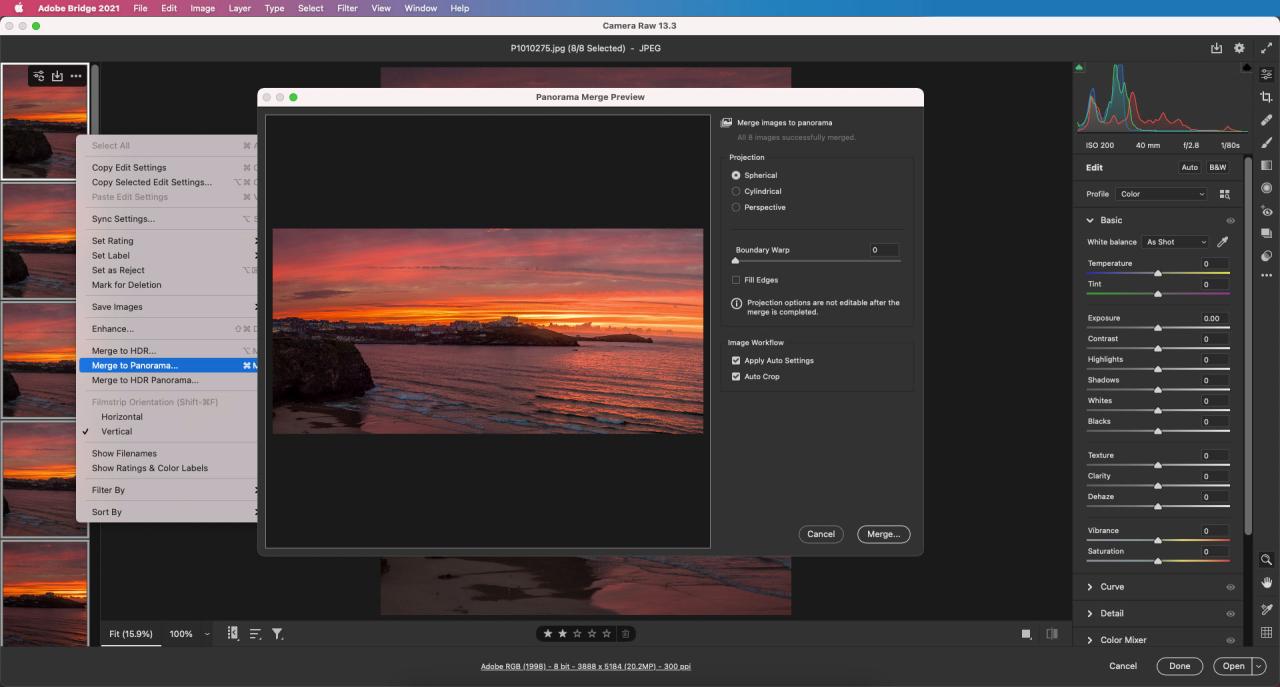
The journey of creating a compelling panoramic landscape photograph doesn’t end with capturing the shots; it extends significantly into the post-processing phase. This stage is where individual images are transformed into a cohesive, expansive view, and where artistic vision is fully realized. The primary goals of post-processing are to achieve a seamless blend of the constituent images, correct any technical imperfections, and enhance the overall aesthetic appeal to convey the grandeur and mood of the scene.Stitching multiple images together is the foundational step in panoramic photography.
This process involves aligning overlapping sections of adjacent photographs and blending them to create a continuous, high-resolution image. Advanced algorithms analyze the content of the overlapping areas to identify matching features, ensuring a smooth transition without visible seams. The software then warps and aligns the images, creating a unified canvas that represents a much wider field of view than a single shot could capture.
Common Adjustments for Panoramic Enhancement
Effective post-processing involves a series of adjustments that refine the image’s visual qualities. These adjustments are crucial for correcting minor exposure differences between frames, boosting the impact of the scene through contrast, and establishing a specific mood or atmosphere with color grading.
- Exposure Correction: Minor variations in exposure between individual frames can lead to noticeable banding or inconsistent brightness across the panorama. Software can automatically or manually adjust these exposures to create a uniform luminosity. This ensures that bright skies and darker foregrounds are balanced without clipping highlights or crushing shadows.
- Contrast Enhancement: Increasing contrast can add depth and dimension to a panoramic image, making details pop and the overall scene more dramatic. This can involve adjusting the overall contrast slider or selectively enhancing contrast in specific areas, such as mountains or clouds, to emphasize their texture and form.
- Color Grading: Color grading is used to establish a specific mood or to enhance the natural beauty of the landscape. This might involve warming the colors to evoke a sunset, cooling them for a crisp morning feel, or desaturating certain hues to create a more subdued atmosphere. The goal is to create a visually pleasing and emotionally resonant image.
Techniques for Geometric Correction
Ensuring the geometric integrity of a panoramic image is as important as its tonal and color balance. Misaligned horizons or distortion introduced by wide-angle lenses can detract from the viewer’s experience.
- Horizon Straightening: A crooked horizon is one of the most common and distracting errors in photography. Panoramic stitching software typically includes tools to detect and correct the horizon line, ensuring it is perfectly level. This is often achieved by identifying prominent horizontal features in the scene and using them as guides for alignment.
- Lens Distortion Correction: Wide-angle lenses, often used for panoramic shots, can introduce barrel distortion (lines bowing outwards) or pincushion distortion (lines bowing inwards). Post-processing software can apply lens profiles to counteract these effects, rendering straight lines as they should appear, which is particularly important for architectural elements or straight natural features.
Recommended Software Tools for Panoramic Image Editing
The selection of appropriate software is vital for achieving professional-quality panoramic images. These tools offer sophisticated features for stitching, editing, and enhancing.
- Adobe Photoshop: Widely regarded as the industry standard, Photoshop offers robust panoramic stitching capabilities through its Photomerge feature. It also provides extensive tools for detailed image editing, including exposure, contrast, color correction, and distortion correction. Its layered workflow allows for non-destructive editing and complex manipulations.
- PTGui: This software is specifically designed for panoramic photography and is renowned for its advanced stitching algorithms, which handle challenging scenes with ease. PTGui offers fine-grained control over the stitching process, lens settings, and output options, making it a favorite among professional panoramic photographers.
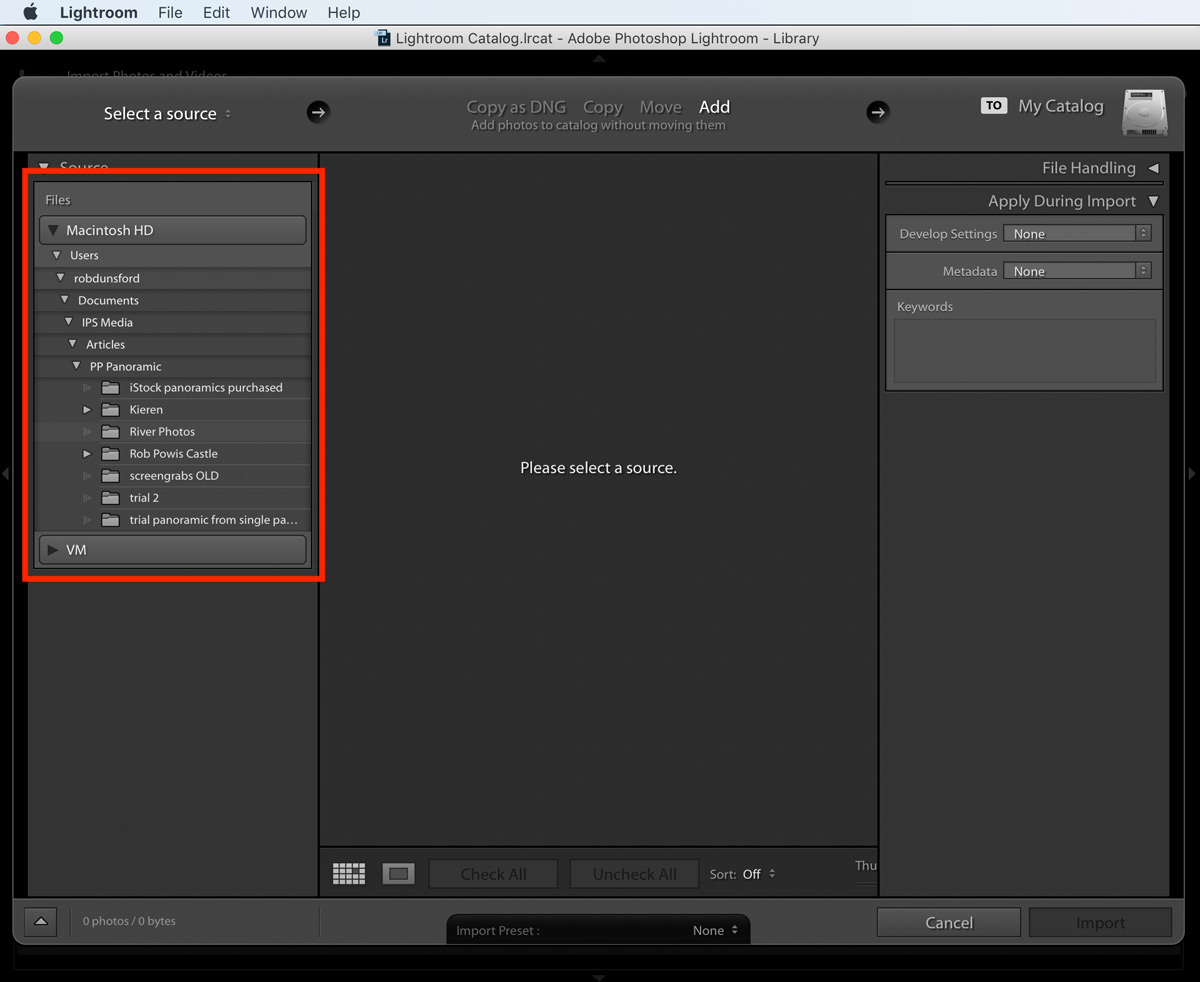
- Lightroom Classic: While not a dedicated stitching program, Lightroom Classic can import and manage panoramas created by other software. It excels in its RAW processing capabilities, offering powerful tools for global and local adjustments to exposure, contrast, color, and sharpness, all within a streamlined workflow.
- Affinity Photo: A powerful and more affordable alternative to Photoshop, Affinity Photo also includes a capable panorama stitching feature and a comprehensive suite of editing tools that rival those found in more expensive programs.
Lighting and Environmental Factors
The quality of light and prevailing environmental conditions are paramount in shaping the mood, drama, and overall aesthetic of panoramic landscape photographs. Understanding how to harness these elements can transform a good image into a truly captivating one. This section delves into the nuances of natural light and atmospheric phenomena, offering practical guidance for their effective use in panoramic photography.Natural light is the most powerful tool a landscape photographer has.
Its character changes dramatically throughout the day and year, influencing color, contrast, and shadow. By understanding these shifts, photographers can choose the optimal moment to capture a scene, ensuring it conveys the desired emotional impact.
The Impact of Natural Light on Mood
Different types of natural light evoke distinct emotional responses and visual qualities in panoramic landscapes. The warmth of golden hour can imbue a scene with serenity and nostalgia, while the crispness of midday sun can highlight textures and details with stark clarity.
- Golden Hour (Sunrise and Sunset): Characterized by warm, soft, and directional light, the golden hour casts long shadows and saturates colors, creating a sense of warmth, tranquility, and often, a touch of magic. This light is ideal for softening harsh features and enhancing the emotional resonance of a landscape.
- Blue Hour (After Sunrise and Before Sunset): This period offers a cool, diffused light that produces deep blues and purples. It is excellent for creating a serene, contemplative mood and can beautifully accentuate silhouettes and the subtle gradients of the sky.
- Midday Light: While often considered harsh, midday light offers high contrast and can reveal intricate details and textures. It’s best used when strong graphic elements or stark contrasts are desired, though it can be challenging to manage deep shadows and blown-out highlights in wide panoramas.
- Overcast Light: Diffused and even, overcast light eliminates harsh shadows and provides a soft, flattering illumination. This type of light is perfect for capturing subtle color variations and details without the distraction of strong shadows, making it excellent for scenes with intricate foliage or delicate rock formations.
Optimal Times for Dramatic Light
Capturing dramatic light in wide panoramic scenes is often about timing and anticipating the sun’s position. The transitional periods of the day offer the most dynamic lighting opportunities.
- Sunrise and sunset are universally recognized as prime times for dramatic light due to the low angle of the sun. This low angle creates long, dramatic shadows that add depth and dimension to the landscape, while the atmospheric scattering of light produces vibrant hues of orange, red, and pink.
- The hour following sunrise and the hour preceding sunset, often referred to as the “golden hours,” provide soft, warm, and directional light that sculpts the landscape. This light can accentuate the contours of hills, valleys, and coastlines, leading the viewer’s eye through the panoramic frame.
- Twilight, or the “blue hour,” offers a unique opportunity for a different kind of drama. The lingering light creates a serene, almost ethereal atmosphere, and the deep blue tones can lend a sense of mystery and calm to a panoramic vista.
Shooting in Challenging Weather Conditions
Adverse weather conditions, often perceived as obstacles, can actually be powerful allies in creating unique and compelling panoramic images. Embracing them can lead to results that stand out from the ordinary.
- Rain and Storms: The dramatic skies that accompany rain and storms, with their dark, brooding clouds and shafts of light, can add immense mood and intensity to a panorama. The wet surfaces of the landscape often reflect light, enhancing colors and textures.
- Fog and Mist: These atmospheric elements can simplify a scene, abstracting details and creating a sense of depth and mystery. They can also soften the light and reduce contrast, making them ideal for creating ethereal and dreamlike panoramic compositions.
- Snow and Ice: A blanket of snow can transform a familiar landscape into a pristine, monochromatic world. The way light interacts with snow – its brightness, texture, and the shadows it casts – can create stunning visual effects in a panoramic format.
- Wind: While challenging for sharp images, wind can add dynamism to a panorama by creating motion in elements like grasses, trees, or water, adding a sense of energy and movement.
Utilizing Atmospheric Elements
Atmospheric elements like fog, mist, and even dust can significantly enhance panoramic compositions by adding layers, depth, and a unique mood.
Atmospheric elements act as natural diffusers and layering agents, softening harsh lines and introducing a sense of scale and mystery into panoramic vistas.
- Fog: Fog can dramatically simplify a scene, obscuring distant details and creating a soft, ethereal quality. In a panorama, fog can lead the eye into the scene, creating a sense of discovery as elements emerge from the haze. It is particularly effective in forested areas or along coastlines, where it can create a sense of isolation and tranquility.
- Mist: Lighter than fog, mist often hangs in the air, adding a subtle veil that softens the landscape and enhances the perception of depth. It can create beautiful halos around light sources and add a romantic quality to a scene, especially when it clings to valleys or mountain slopes.
- Haze: While sometimes seen as detrimental, a light haze can add atmospheric perspective, making distant elements appear softer and bluer, thus enhancing the sense of vastness in a panorama.
Light Interaction with Landscape Features
The way light interacts with different landscape features is fundamental to creating visually engaging panoramic images. Understanding these interactions allows for deliberate compositional choices.
- Mountains: During golden hour, the sun’s low angle can illuminate the faces of mountains, creating a striking contrast with the shadowed valleys below. This directional light accentuates the ruggedness and scale of mountain ranges. In midday light, the texture of rock faces and snowfields is more apparent.
- Water Bodies (Oceans, Lakes, Rivers): Light reflecting off water can create dazzling highlights or a smooth, mirror-like surface, depending on the angle of the sun and the texture of the water. During sunset, the water can mirror the vibrant colors of the sky, doubling the visual impact in a panoramic shot. Calm waters can reflect the entire scene, creating symmetrical compositions.
- Forests and Trees: Sunlight filtering through a forest canopy creates dappled light and dramatic shafts of light, adding a sense of depth and wonder. In a panorama, this can lead the viewer’s eye along paths of light into the heart of the woods. Overcast light is ideal for capturing the rich greens and intricate details of foliage without harsh shadows.
- Deserts and Plains: The vast, open nature of deserts and plains benefits greatly from directional light that casts long shadows, defining the contours of sand dunes or the subtle undulations of the land. The intense light of midday can emphasize the stark beauty and textures of these environments.
Final Review
Mastering how to shoot wide landscapes in panoramic mode opens up a world of visual storytelling, allowing you to convey the grandeur and atmosphere of any scene. By applying the principles of composition, understanding your equipment, and refining your shooting and editing workflow, you can consistently produce stunning panoramic images that truly immerse the viewer. Embrace these techniques, experiment with different environments, and continue to explore the expansive beauty of our planet through your lens.